
An AI-generated SaaS can look finished long before it is safe to operate. This guide explains how to productionize a prototype across security, reliability, testing, deployment, monitoring, recovery, and cost control.
The product looked finished on Friday.
A founder had built a client onboarding SaaS with AI coding tools in less than three weeks. Agencies could create a workspace, invite a client, collect files, approve a scope, and start a project. Authentication worked. Billing worked. The dashboard looked polished enough for screenshots.
Five agencies were invited into a small beta on Monday.
The first customer completed onboarding without a problem.
The second clicked the invitation twice after the page appeared to freeze and created two workspace memberships. The third uploaded a file large enough to time out the request. A fourth changed teams, but an old invitation still opened a page it should no longer have accessed.
Then the payment provider sent the same webhook twice. The application recorded the subscription event twice because nobody had designed the workflow for a repeated delivery.
None of these failures meant the product was badly built because AI had touched the code.
They meant the product had been built for the conditions of a demo.
Productionization is the work of preparing it for conditions you do not control.
That difference matters even more now that AI can generate visible product functionality faster than teams can review the assumptions underneath it.
What does it mean to productionize an AI-generated app?
Productionizing an AI-generated app means taking a working prototype and making the product secure, reliable, observable, maintainable, and safe to change.
It does not mean rewriting every line that AI generated.
It also does not mean turning an MVP into an enterprise platform before the first customer arrives.
The goal is control.
Can you explain who can access each important resource? Can a failed job be retried without creating duplicates? Can you tell when the system is unhealthy? Can you deploy a change and reverse it? Do you know what happens when a third-party service is unavailable? Can usage grow without turning one feature into an unexpected infrastructure or model bill?
A production-ready MVP can still be small. It simply has to be deliberate about the failures that matter.
If you are not yet confident about the customer, problem, or smallest useful product, production engineering may be premature. We cover those earlier-stage decisions in Why SaaS products fail before development begins.
And if you already have a working AI-built product but have not tested its launch readiness, start with How to audit an AI-built product before launch.
Productionization begins after those questions become concrete enough to engineer around.
Start with the journey that creates customer value
Do not begin with a list of technologies to improve.
Begin with the path a customer actually depends on.
For the onboarding product, that journey might be:
Create workspace → invite client → collect information → approve scope → activate subscription → start project
Now identify what must remain true at every step.
The right user must see the right workspace. An invitation should work once and expire when appropriate. A repeated click should not create duplicate records. A payment event should move the subscription into one predictable state. A failed email should not erase the underlying action. If a third-party service is slow, the user should know whether the request is still processing, failed, or can be retried.
This changes the production question from:
“Is the code clean?”
to:
“Can the customer complete the job safely when reality becomes messy?”
That journey becomes the spine for architecture, testing, monitoring, and release decisions.
1. Understand the system before changing it
AI coding tools can create functionality across many files, frameworks, services, and patterns very quickly. That is useful during exploration, but production work needs a shared mental model of how the product actually behaves.
Create a simple map of:
- the frontend and backend
- the database and storage
- authentication and authorization
- background jobs and scheduled tasks
- payment and email providers
- AI providers, if the product uses AI features
- analytics and error monitoring
- deployment environments
- secrets and configuration
- the critical data flows between them
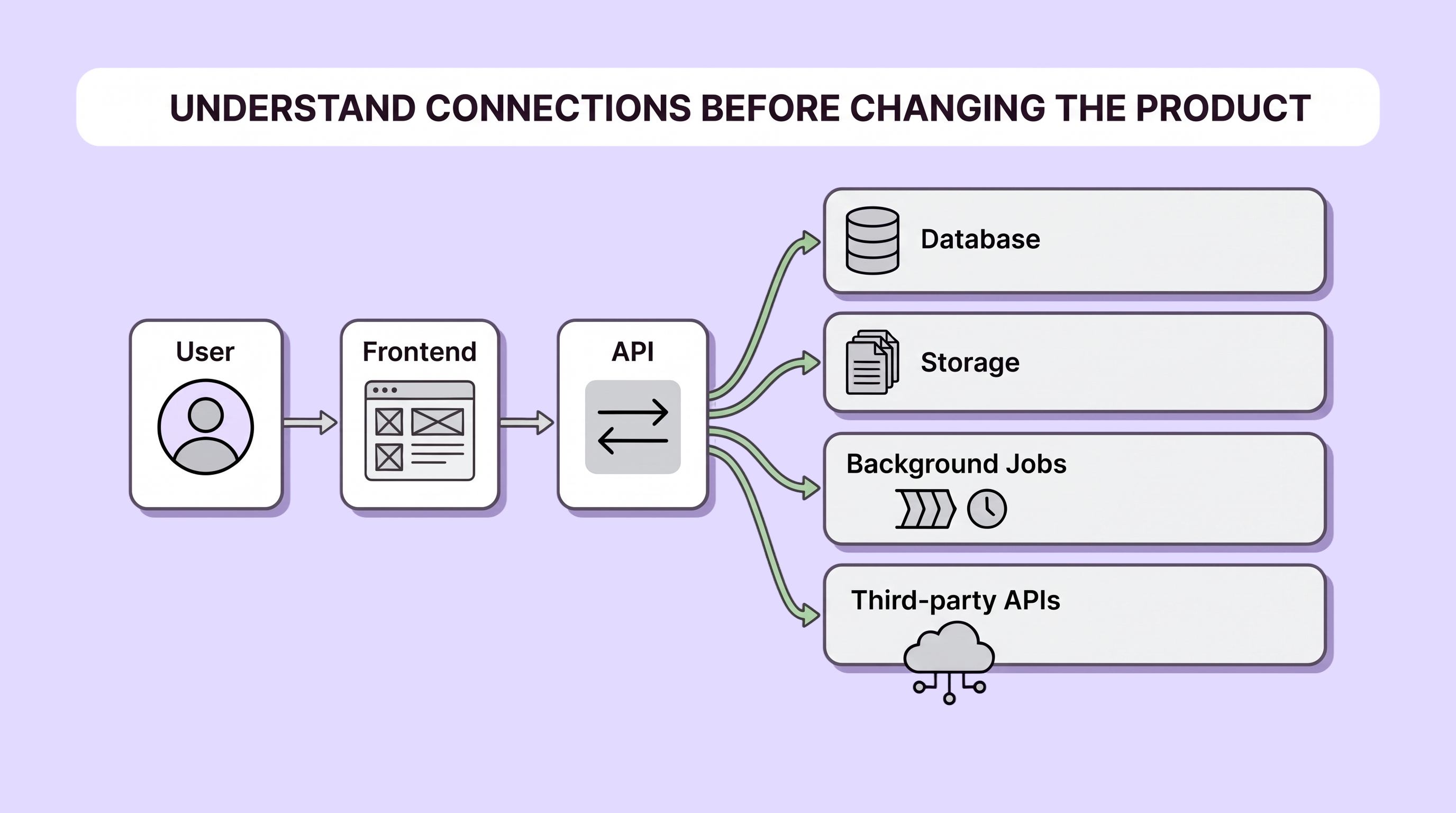
The map does not need to be an impressive architecture diagram. It needs to answer practical questions.
Where is a permission decision enforced? What creates a subscription record? Which process sends an invitation? Which database table represents the final business state? What happens if a worker stops halfway through a job?
Production problems are much easier to fix when ownership is visible.
This is also the point to simplify obvious duplication. If the same business rule exists in three frontend components and two API routes, productionization may mean moving that rule into one trusted place before adding more tests around five conflicting versions.
2. Secure the boundaries, not just the login screen
Authentication answers who the user is.
Authorization answers what that user is allowed to do.
A surprising number of prototypes get the first one right and treat the second as a UI concern.
If the interface hides another customer's project, but the API still returns it when someone changes an ID in the request, the product is not secure.
For multi-tenant SaaS, test the boundaries directly:
- user A requesting user B's records
- members moving between organizations
- downgraded or removed roles
- old invitations
- direct file URLs
- exports
- background jobs
- admin endpoints
- API routes that update or delete data
Also review secrets, database policies, input validation, dependency risk, file uploads, rate limits, and production access.
OWASP's Top 10:2025 places Broken Access Control first among its major web application security risks, alongside issues such as security misconfiguration, software supply-chain failures, authentication failures, and inadequate security logging.
Security should therefore be part of the development process rather than a final launch-day scan. The NIST Secure Software Development Framework similarly treats secure practices as work that should be integrated throughout software development.
3. Make important operations safe to repeat
Real users double-click.
Networks retry.
Browsers refresh.
Payment providers resend webhooks.
Workers crash after completing half of a job.
A prototype often assumes every important request happens exactly once. Production software cannot.
For business-critical operations, ask what happens if the same request arrives twice.
Creating a payment, sending an invitation, starting a document-processing job, consuming a credit, or writing an order should usually have a way to recognize that the action has already been processed.
That might involve:
- idempotency keys
- unique database constraints
- transaction boundaries
- job identifiers
- explicit state machines
- deduplication
- safe retry policies
The exact implementation depends on the workflow. The principle does not.
A retry should help the system recover, not create a second business event.
Also define timeouts and failure states. A request should not sit in an ambiguous "loading" state forever because an external API stopped responding.
4. Design for dependency failure
Most SaaS products are assembled from services they do not control.
Your application may depend on a database platform, object storage, payment processor, transactional email provider, analytics service, AI model, maps API, authentication provider, or several of them at once.
For every dependency in the critical journey, ask:
- What happens when it is slow?
- What happens when it returns an error?
- What happens when it is unavailable?
- Can the request be retried safely?
- Does the user lose work?
- Does the team know the failure happened?
- Can the workflow continue later?
Not every outage needs an elaborate fallback.
Sometimes the correct production behavior is simply: save the user's work, mark the task as pending, explain the delay, and retry in the background.
The important part is that the failure is intentional and visible, not accidental and silent.
5. Test risk, not every possible line of code
Trying to reach perfect test coverage before launch can become another form of procrastination.
Instead, put the strongest tests around the behavior with the largest consequence.
For the onboarding product, that may include:
- users cannot cross workspace boundaries
- an invitation cannot create duplicate membership
- subscription events produce the correct account state
- a failed upload can be retried
- removing a member actually removes access
- the core onboarding flow works on mobile
- database migrations preserve existing data
- the most important background jobs recover from failure
Use unit tests where isolated business logic matters, integration tests where systems meet, and a small number of end-to-end tests around the critical customer journey.
Then test the conditions a demo normally avoids: empty states, malformed input, large files, repeated requests, slow services, expired sessions, partial failure, and concurrent actions.
The objective is not to prove the software has no bugs.
It is to make the most expensive bugs harder to ship.
6. Separate production from experimentation
During prototyping, changing the database directly or deploying from a local machine may feel harmless.
Once customers depend on the product, the release process becomes part of the product.
At minimum, establish:
- source control as the system of record
- separate development and production configuration
- a staging or preview path for meaningful changes
- controlled database migrations
- automated checks before deployment
- protected production secrets
- a repeatable deployment process
- a rollback or recovery plan
You do not need a complicated DevOps platform.
You need to be able to answer:
What changed? Who changed it? What was checked? What happened after release? How do we recover if the release is bad?
That discipline becomes more important as AI increases the speed at which code can be changed.
Fast code generation without controlled delivery can simply move mistakes into production faster.
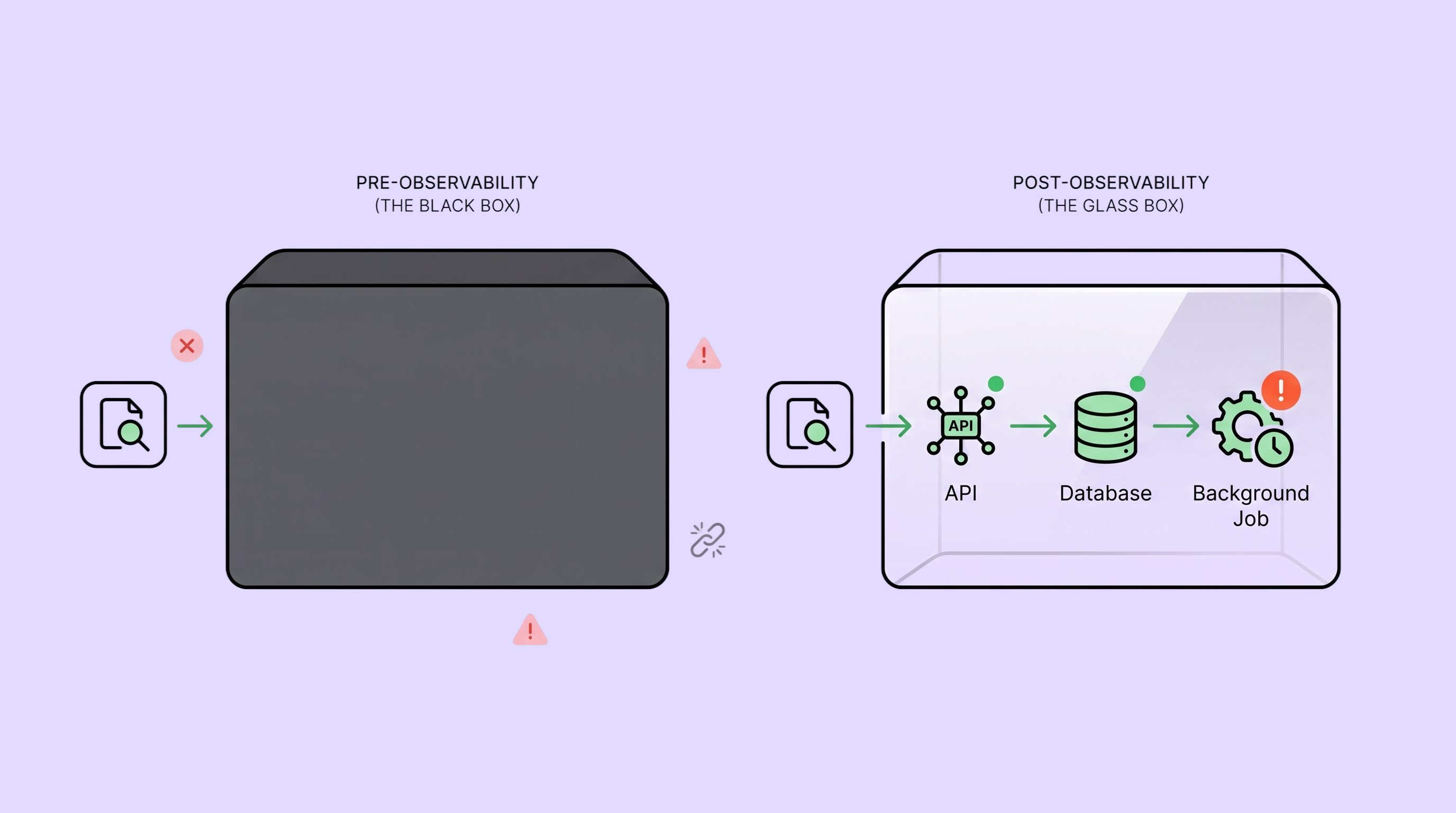
7. Add observability before the first serious incident
An error message from a customer is not a monitoring system.
Before launch, you should be able to see enough of the critical journey to understand whether the product is healthy.
That usually includes:
- structured application logs
- error tracking
- failed background jobs
- important business events
- latency for critical requests
- dependency errors
- database and infrastructure health
- deployment history
- alerts for failures that require action
Google's Site Reliability Engineering guidance on monitoring describes four useful signals for user-facing systems: latency, traffic, errors, and saturation.
A small SaaS does not need Google's infrastructure. The principle is still useful: monitor the signals that tell you whether customers can actually use the product.
Do not create dashboards nobody watches. Start with questions you will need during an incident:
What broke? When did it start? Who was affected? Which release or dependency changed? Can we recover?
8. Put limits around usage and cost
A prototype is usually tested by one founder.
Production is tested by user behavior.
Someone will upload a bigger file than expected, create hundreds of records, call an endpoint repeatedly, or trigger the most expensive path far more often than your spreadsheet assumed.
Set intentional limits around:
- upload size
- API requests
- background jobs
- storage
- email volume
- exports
- third-party calls
- AI tokens or model usage
- plan-level quotas
Then monitor the cost drivers that matter.
If the product includes AI features, this becomes especially important because one visible feature may trigger multiple model calls, retries, embeddings, or long-context requests behind the scenes.
Productionizing the feature means controlling both behavior and economics.
9. Make releases reversible
A production deployment should not be an act of faith.
For meaningful changes, define what success looks like before release and what evidence would make you stop or roll back.
That may mean:
- feature flags
- staged rollouts
- migration backups
- backward-compatible changes
- versioned APIs
- database restore procedures
- keeping the previous deployment available
- a documented rollback command
The team should practice recovery before the first emergency.
DORA's software delivery performance metrics include measures such as deployment frequency, change lead time, failed deployment recovery time, change fail rate, and deployment rework rate. The useful idea for an early SaaS team is not to chase a benchmark; it is to make delivery and recovery measurable enough to improve.
A team that can ship a small change, observe its effect, and recover quickly has a much healthier production system than one that avoids releases because nobody trusts what will happen.
What if the app also contains AI features?
There are two separate questions that often get mixed together:
Was the software built with AI?
and:
Does the product itself use AI at runtime?
If AI helped generate React components, database queries, tests, or backend code, the production concerns are largely the same as any other SaaS product: architecture, security, reliability, testing, operations, and maintainability.
If the product also sends customer input to an AI model, there is another production layer.
You need to think about:
- hallucinated or invalid output
- prompt injection
- sensitive information
- model and provider changes
- latency
- token and usage cost
- structured output validation
- fallbacks
- human approval for high-impact actions
- evaluations using realistic examples
Do not let a probabilistic model become the final authority for an irreversible business action without deterministic checks around it.
That deeper AI-runtime layer deserves its own implementation plan. But it sits inside the larger production system described here; it does not replace it.
A practical production-readiness checklist
Before opening an AI-generated SaaS to real customers, you should be able to answer yes to most of these questions:
Product and critical journey
- Do we know the first customer and the job they are trying to complete?
- Have we mapped the critical journey from sign-up to value?
- Have we tested empty, failed, repeated, and returning states?
Security and data
- Is authorization enforced on trusted backend boundaries?
- Have we tested cross-account and cross-workspace access?
- Are secrets protected outside the codebase?
- Are uploads, inputs, and sensitive data handled intentionally?
- Can access be removed when a role or membership changes?
Reliability
- Are critical operations safe to retry?
- Do important background jobs expose failure states?
- Can third-party outages fail gracefully?
- Are backups available and have we verified the recovery path?
- Can expected usage exceed a single founder's test data without breaking the system?
Delivery
- Do meaningful changes pass automated checks?
- Are database migrations controlled?
- Can we deploy repeatably?
- Can we roll back or recover from a bad release?
- Do we know which version is currently running?
Visibility and operations
- Are application errors captured?
- Can we see failures in the critical journey?
- Are important jobs and integrations monitored?
- Do alerts point to something actionable?
- Can we tell which users were affected by an incident?
Cost and abuse
- Are there sensible limits on expensive actions?
- Can one user accidentally create an extreme bill?
- Do we monitor the infrastructure, API, storage, and AI costs that can grow with usage?
You do not need every enterprise control before inviting ten beta users.
You do need controls that match the consequences of the product you are asking those users to trust.
Should you rewrite an AI-generated app before production?
Usually, no.
Generated code is not automatically bad code, and human-written code is not automatically production-ready.
A rewrite is justified when the existing foundation makes the critical product unsafe or unreasonably difficult to operate: authorization is fundamentally broken, the data model cannot support the real product, critical workflows are tangled beyond safe change, or the system depends on patterns the team cannot maintain.
More often, the right approach is selective.
Keep what behaves predictably. Refactor confusing boundaries. Replace risky components. Add tests around critical behavior. Strengthen the release process. Remove parts the product no longer needs.
If your SaaS is already live and the team is afraid to touch it, productionization has become a rescue problem. How to rescue a SaaS product you don't trust explains how to decide what to keep, repair, replace, or retire.
The question is not whether AI wrote the code.
The question is whether your team can understand it, operate it, change it, and recover when something fails.
Production-ready does not mean finished
Two weeks after the beta problems, the onboarding SaaS still did not have every feature on the roadmap.
It had fewer surprises.
Workspace access was enforced on the server. Invitations could not create duplicate memberships. Payment events were idempotent. Large uploads moved through a background job. Failed jobs were visible. Releases went through a preview environment and automated checks. Error monitoring pointed the team to the affected request instead of waiting for a customer screenshot.
The product was not complete.
It was operable.
That is the standard founders should aim for.
AI has made it dramatically faster to create software. The next advantage will not come from generating even more code. It will come from building the systems around that code that make fast development safe enough to continue.
A prototype says:
We built it.
Production says:
We can run it.
Frequently Asked Questions
What does it mean to productionize an AI-generated app?
Productionizing an AI-generated app means preparing a working prototype for real users by strengthening the areas that demos usually do not prove: access control, data handling, architecture, retries, failure recovery, testing, deployment, monitoring, rollback, usage limits, and maintainability.
It does not require rewriting the product simply because AI generated part of the code.
Is AI-generated code safe for production?
It can be, but it should be reviewed and tested according to the risk of the behavior it controls.
Code handling authentication, permissions, payments, customer data, uploads, database changes, background jobs, third-party integrations, and irreversible actions deserves stronger review before production.
Do I need to rebuild a vibe-coded SaaS before launch?
Not automatically.
Start by understanding the existing architecture and auditing the highest-risk workflows. Keep the parts that behave predictably, repair contained problems, and replace components only when the current implementation makes safe progress unreasonable.
What should I fix first before launching an AI-built SaaS?
Start with anything that can expose customer data, corrupt important state, lose money, block the product's core job, or leave the team unable to detect and recover from a failure.
In practice, access control, critical data flows, payments, retries, background jobs, deployment safety, monitoring, and backups usually rank above cosmetic improvements.
How much testing does an MVP need before production?
An MVP does not need exhaustive test coverage.
It does need strong evidence around its critical customer journey and the failures with the highest consequence. Use unit, integration, and end-to-end tests where each gives useful confidence, then manually test edge cases such as duplicate actions, invalid input, expired sessions, slow dependencies, and interrupted workflows.
How do I know when the app is production-ready?
The app is closer to production-ready when the team can explain and test the critical journey, enforce customer data boundaries, recover from expected failures, deploy and roll back changes predictably, observe production health, and control the usage patterns that could create operational or cost problems.
Production-ready does not mean bug-free. It means the important risks are understood and controlled.
A production-readiness review helps turn that uncertainty into a prioritized plan. SaaS Loom's Vibe Code Launch Audit looks at the product, user journey, architecture, security, reliability, AI behavior, and launch operations together, then separates what must be fixed before launch from what can safely wait.